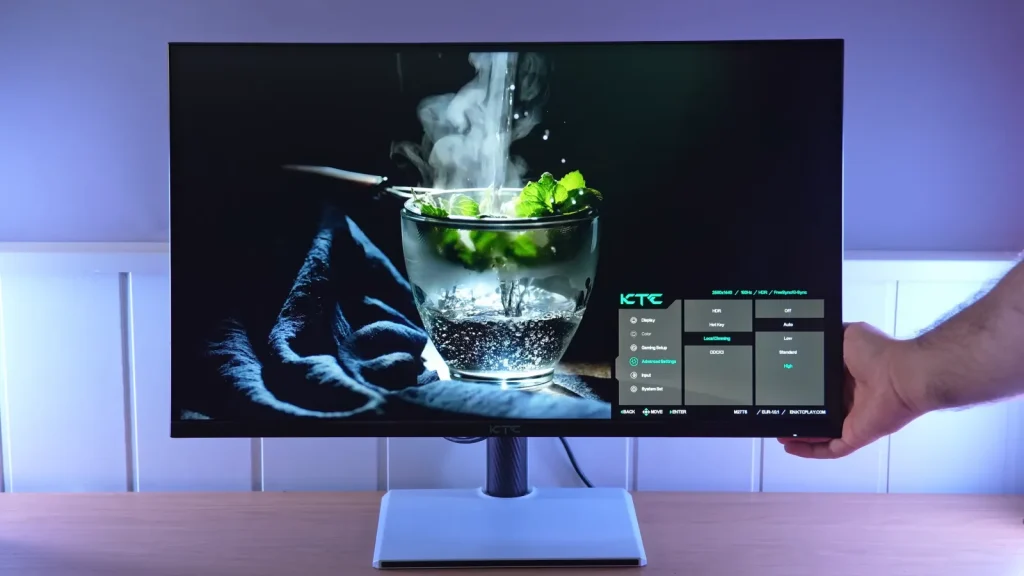
The KTC M27T6 combines VA contrast with Mini LED dimming and a wide color gamut. Its blooming control is interesting, but HDR brightness changes over time, and dark transitions remain a significant limitation.
The choice between DisplayHDR and HDR600 cannot be made by looking at peak nits alone. Extended tests and motion photos better explain the conditions in which each setting works.
Build, stand, and finish
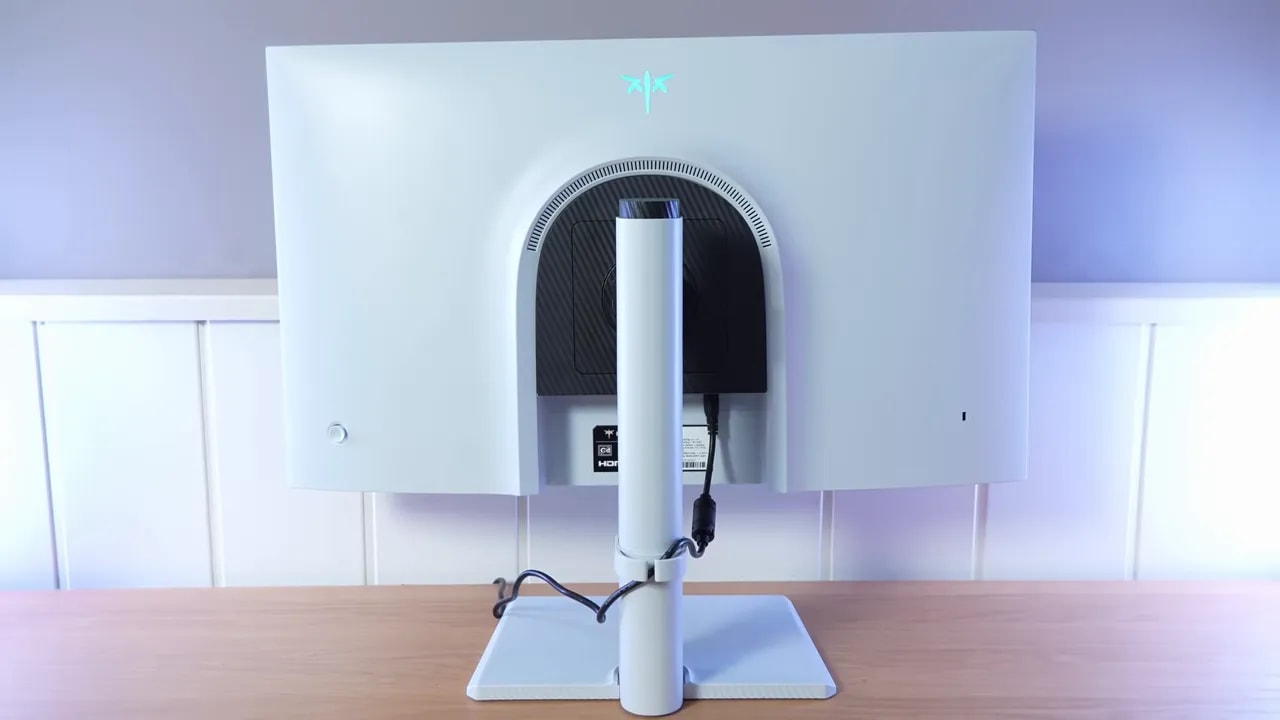
I will not spend forever on the packaging, but there are several important details. The KTC M27T6 includes a stand very similar to that of the brand’s 320 Hz model, which is good news. It is a fairly complete stand offering practically every ergonomic adjustment.
The construction is quite well executed. It does not feel like a cheap product in your hands, at least where it matters. Assembly feels solid, and overall quality is very much in line with other KTC models that previously made a good impression.
As for the panel coating, the surface is matte. It is neither one of those aggressive matte finishes that washes out the image too much nor so light that reflections become obvious. It strikes a fairly comfortable middle ground. Certain lights or LED strips behind you do not show up too strongly, though more direct sources are noticeable.
Color: professional presets and native gamut
One of the most interesting aspects of the KTC M27T6 is color. There are several professional modes for specific color spaces, plus a native-gamut mode for those who want to get the most out of the panel. The important detail is that not every mode is equally useful, and one is more marketing than practical benefit.
sRGB
The sRGB mode is implemented quite well. Its gamut clamp is reasonable, and color accuracy is generally satisfactory. Reds are somewhat oversaturated and blue falls a little short, but the overall result is good.
Grayscale balance is also decent. Color temperature leans slightly warm, at around 6300 K compared with the 6500 K standard, but the deviation is small. The sRGB gamma curve is also followed quite well.
This is achieved using the User preset with color temperature set to Standard. That detail matters, because switching the temperature to another setting worsens the measurements in all professional modes.
DCI-P3
In DCI-P3, the KTC M27T6 reaches around 94% coverage on the 1976 reference chart. That is a good figure, and once again, color accuracy is similar to sRGB mode. The pattern of slightly boosted reds and weaker blues repeats.
Grayscale behavior is similar too. The red channel rises more than it should, so there is room for improvement, though it is far from a disaster.
Switching the temperature from Standard to User without changing the values makes the monitor warmer, lowers color temperature, worsens grayscale balance, and pushes the red channel up further. In return, brightness increases slightly, from approximately 400 to 420 nits, and contrast improves somewhat too.
Adobe RGB
Adobe RGB coverage is close to 93%, which is also quite good for this type of monitor. Color accuracy remains solid, and grayscale performance is practically identical to the other calibrated modes.
This is where the KTC M27T6 becomes a little more questionable from a marketing standpoint. The monitor includes a mode labeled Rec.2020, but it comes nowhere near covering that entire gamut. It reaches around 79%, which is high for an LCD, yes, but still only partial coverage.
That is why this mode feels a little like clickbait. Make no mistake: no monitor in this class covers 100% of Rec.2020, because it is an extremely wide space. Also, without full coverage, color accuracy in that mode cannot be truly good. Grayscale is set to gamma 2.4 as well.
If you want to get the widest range of color out of the KTC M27T6‘s panel, the native gamut is the best choice. It reaches around 81% of BT.2020there, even a little more than in the dedicated Rec.2020 mode.
DCI-P3 coverage is around 96%, Adobe RGB reaches 93,4% , and sRGB is fully covered. The downside is that native-gamut oversaturation, especially in reds and blues, is quite obvious.
So, for serious work in sRGB, DCI-P3, or Adobe RGB, the professional modes are the logical choice. For gaming and enjoying more vivid colors, however, native mode makes perfect sense.
The problem is that calibration worsens in native mode. Leaving it on Standard makes the color temperature quite cool and grayscale performance fairly poor. The most sensible recommendation is to set the temperature to warm, which gets closer to 6500 K and improves grayscale behavior, though it still trails the calibrated modes.
In this configuration, brightness also rises to around 420 nits and contrast improves over the professional modes. Using User temperature increases brightness further, to around 435 nits, but at the cost of approaching 7000 K and clearly upsetting RGB balance.
Manual color temperature adjustments can reduce much of native mode’s oversaturation. Calibration produced an ICC profile, accompanied by custom temperature values, that can serve as a starting point. Even so, remember one basic fact: two units of the same monitor do not behave exactly alike, so someone else’s profile never replaces calibrating your own unit.
These profiles are also much more relevant to work and production than to gaming alone.
Overall, the color coverage of the KTC M27T6 falls a little short of what a QD-OLED can offer, but it is among the strongest seen on LCDs in this price range. There is a clear reason for that: it uses Quantum Dot, a technology specifically designed to expand the color gamut.
Contrast, dimming zones, and viewing angles
Measurements were taken with a new colorimeter and better software than used in previous reviews, though tests were also repeated with the old colorimeter for comparison with other monitors. This changes some values, particularly contrast, where the old instrument reported much higher figures.
With Warm temperature and native gamut, the KTC M27T6 reached around 3771:1 contrast and around 443 nits in that other measurement. User mode could go a little higher still.
One very positive detail is brightness uniformity. Performance is quite good both in Warm with native gamut and in User. On many budget monitors, setting color temperature to User ruins uniformity, but here it holds up quite well.
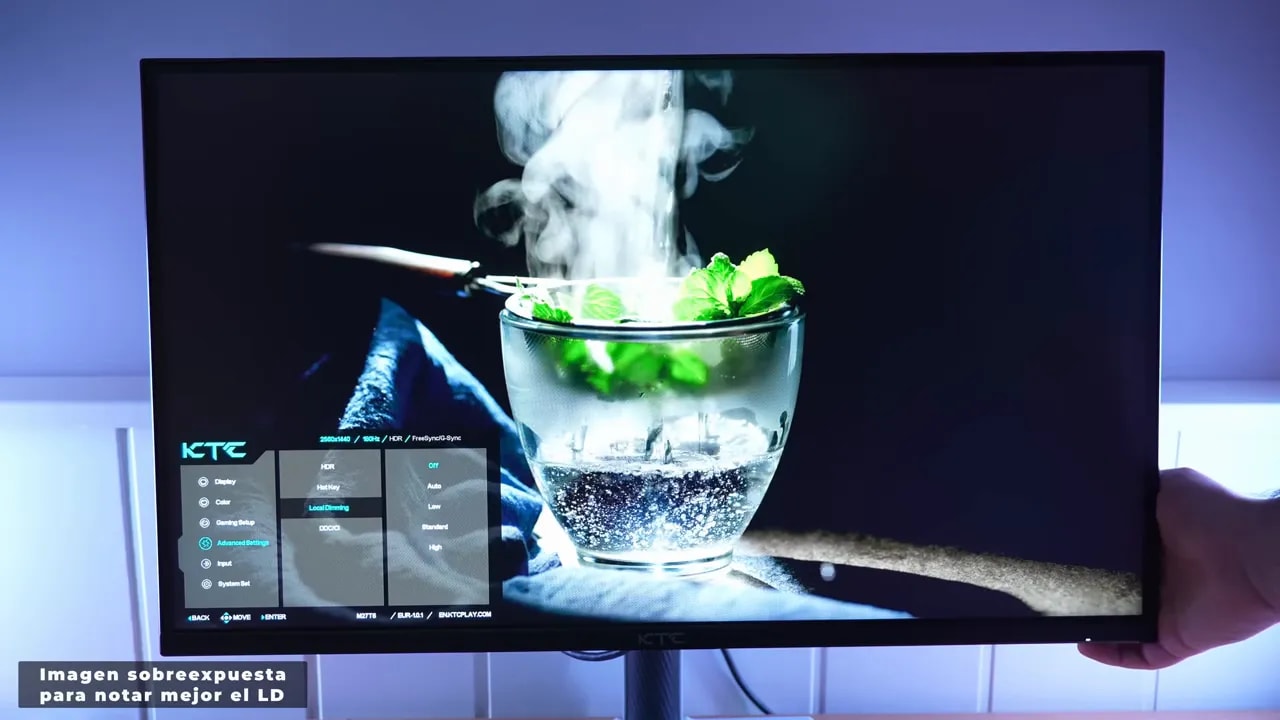
The KTC M27T6 is Mini LED, meaning its backlight consists of many small LEDs spread behind the panel. These LEDs can dim or turn off according to the content to improve blacks. That is local dimming.
The monitor offers several adjustment levels, and measurements lead to a clear conclusion: enabling local dimming lowers brightness considerably compared with leaving it off, but contrast increases dramatically.
In fact, at low brightness levels, such as 25%, perceived contrast becomes so high that the colorimeter could not even measure it properly, as though it were interpreting behavior similar to OLED. Technically it is not OLED, of course, but the visual improvement is very large.
The tradeoff is that higher local dimming levels make the image appear somewhat darker. Greater perceived contrast therefore comes with a less luminous SDR image. Something similar happens in HDR.
Every Mini LED panel suffers to some degree from the well-known blooming, the halo that appears around bright objects on dark backgrounds. This happens because there is not one LED per pixel, as with OLED, but dimming zones. In this case, the KTC M27T6 has 1152 zones, which is quite a lot.
Here is the interesting part: among the Mini LED monitors compared, this one shows the least blooming. Less than the AOC VA Mini LED with 336 zones and less than the Xiaomi Mini LED with an IPS panel, which also had 1152 zones.
Some is noticeable, of course, especially in dark environments when you are looking for it. The technology is not perfect. Even so, it is very well contained, and in SDR it is hard to find it bothersome. In HDR, it can become somewhat more visible, particularly in High mode, because the backlight turns off more aggressively, accentuating the effect a little. Still, it does not become especially problematic.
For photo editing or color-critical work, disabling local dimming remains the sensible choice. Even limited blooming can affect the perception of adjacent colors. For movies, shows, and games, however, it works very well.
Enabling local dimming on the KTC M27T6 also helps greatly reduce VA glow, which is further enhanced by the Quantum Dot layer. Viewing dark tones from the side can reveal a reddish tint.
This is not exclusive to this monitor. It also happens on IPS panels with Quantum Dot, and something similar occurred on the Xiaomi Mini LED. With local dimming enabled, the effect practically disappears.
In general, LCDs with Quantum Dot, whether IPS or VA, tend to look somewhat redder when compared with an LCD without that layer. Measurements do not always clearly reflect it, but it is visually noticeable.
If you are coming from IPS panels, you will notice this quickly. The viewing angles on the KTC M27T6 are fairly poor. Viewed from the sides, colors fade and distort quite easily, and the same happens from above and below.
It looks good when viewed straight on, as you normally would. And since the screen is 27 inches, the issue is less pronounced than on larger sizes. But it remains a clear VA panel limitation. Even sitting in front of it, looking toward the corners can reveal some loss of color consistency. Anyone accustomed to IPS will notice it.
HDR: initial peak versus sustained brightness
Here comes the biggest complication with the KTC M27T6. The monitor has several HDR modes, including a main mode called Display HDR and a separate HDR600 mode. The problem lies specifically in the main mode’s behavior.
Display HDR mode advertises very high brightness peaks, and measurements did indeed reach around 1450 nits. The problem is that this level is not sustained. With a full-screen white image, brightness gradually falls until it stabilizes at around 600 to 650 nits.
And this does not take long. It reaches that range within about 5 to 10 minutes. Power consumption also falls at the same time, from more than 90 W to somewhere in the 50 W range.
Most puzzlingly, briefly switching windows and returning to the white background raises brightness again, followed by the same decline. This suggests behavior tied to firmware or the monitor’s control logic more than a specific physical power supply limitation.
This behavior was also compared with the Xiaomi Mini LED, which showed something similar but much less aggressive. The Xiaomi’s decline was so gradual and moderate that it went unnoticed in normal use. On the KTC M27T6, by contrast, the reduction is much clearer.
The good news is that the monitor includes USB for updates, so if this depends on firmware, there is a possibility it can be corrected.
This variable brightness makes HDR calibration quite complicated. Even so, after extensive testing, the best results came once the panel had stabilized at those 600-plus nits. Even then, luminance tracking was not ideal.
HDR600 mode is interesting because, at first glance, it may seem pointless on a monitor boasting much higher peaks. Measurements explain why it is there, however. In HDR600, brightness does not fall drastically. There may be a small decline over time, yes, but nothing comparable to the other modes. After 10 minutes, the loss was only around 10 or 20 nits.
This suggests KTC is aware of the main mode’s limitation and included this setting as a more stable, controlled HDR mode.
It also produces the best PQ EOTF curve response. Luminance could still improve, but at least it is more consistent. One small bug did appear: switching to HDR600 after testing the Display HDR brightness decline can make brightness fall below 300 nits. Enabling HDR600 directly avoids that issue.


The extended test explains HDR performance better than an isolated peak: DisplayHDR loses brightness until it settles at around 600–650 nits, while HDR600 maintains much more constant output. This variation also changes how highlights are rendered.
In HDR, the KTC M27T6 reaches around 78% of BT.2020. As with practically every monitor on the market, it does not cover the entire gamut, so saturation and calibration within that space could improve. For color volume, which also accounts for brightness, the BT.2020 percentage drops below 70%.
Motion: average response time is not enough
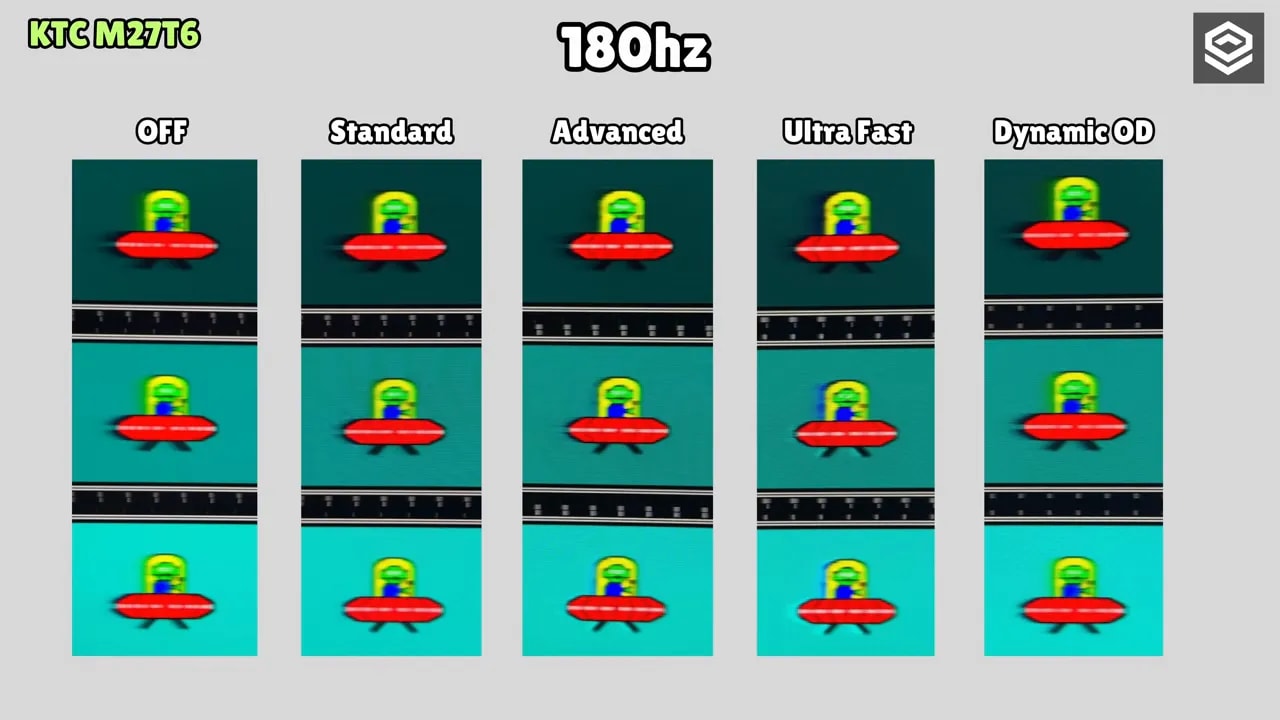
The KTC M27T6 offers several selectable overdrive modes, even with HDR enabled. As expected from a VA panel, smearing is present in dark transitions. It is not at the level of a very slow VA from years ago, but it is noticeable enough when coming from fast monitors.
The most balanced overdrive mode is Standard. Initial response time is quite good for a VA, but many transitions, especially dark ones, weigh heavily, and some overshoot appears. Switching to Advanced makes overshoot surge. Choosing Dynamic OD eliminates overshoot, but response times rise too much.
UFO-style captures show this quite clearly. Smearing remains noticeable in every overdrive mode. The faster modes add overshoot as well. It never disappears entirely.
This has a very clear consequence: if competitive gaming is the priority, honestly, it would not be the best purchase. For that specific use, the KTC M27T6 is not ideal.


Standard provides the balance chosen for this VA. Advanced pushes transitions harder, with a corresponding increase in overshoot. Slow dark transitions and smearing need to be considered alongside the average, as the review’s motion photos show.
In SDR, enabling local dimming helps reduce perceived ghosting somewhat, though the change is not huge. In HDR, the difference is much more noticeable. With local dimming active in HDR, much of the smearing is reduced, making it a partial workaround.
The problem is that many competitive games do not even use HDR properly. You can force it through Windows, yes, but colors change and likely will not suit everyone’s taste. It works as a partial solution, but it is an odd one.
On paper, having a lower initial response time than the competing AOC Mini LED might suggest the KTC M27T6 should be faster. In practice, it is not. Dark transitions carry more weight, and the UFO test looks worse.
The differences are also clear against the Xiaomi Mini LED IPS. A modern fast IPS remains clearly superior for competitive gaming and reducing ghosting at 180 Hz. The Xiaomi wins in that particular scenario.
VRR and backlight behavior
The KTC M27T6 includes a low input lag that can be used alongside FreeSync, G-Sync Compatible, and HDR. It does reduce input lag somewhat, though the difference is not especially noticeable in real use. Since it introduces no major restrictions, it can be left enabled without issue.
The monitor supports VRR, and can use G-Sync Compatible, FreeSync, and Adaptive Sync without problems. Testing was done with an Nvidia graphics card, and it worked correctly despite lacking official Nvidia certification.
As expected from a VA, some VRR flicker remains, but it did not seem excessive. It is much more noticeable on other VA panels. Here it is quite well contained.
It is also good that G-Sync Compatible and HDR can be enabled simultaneously without problems. There is even a refresh-rate display in the OSD, though it does not update in real time unless you keep opening and closing the menu.
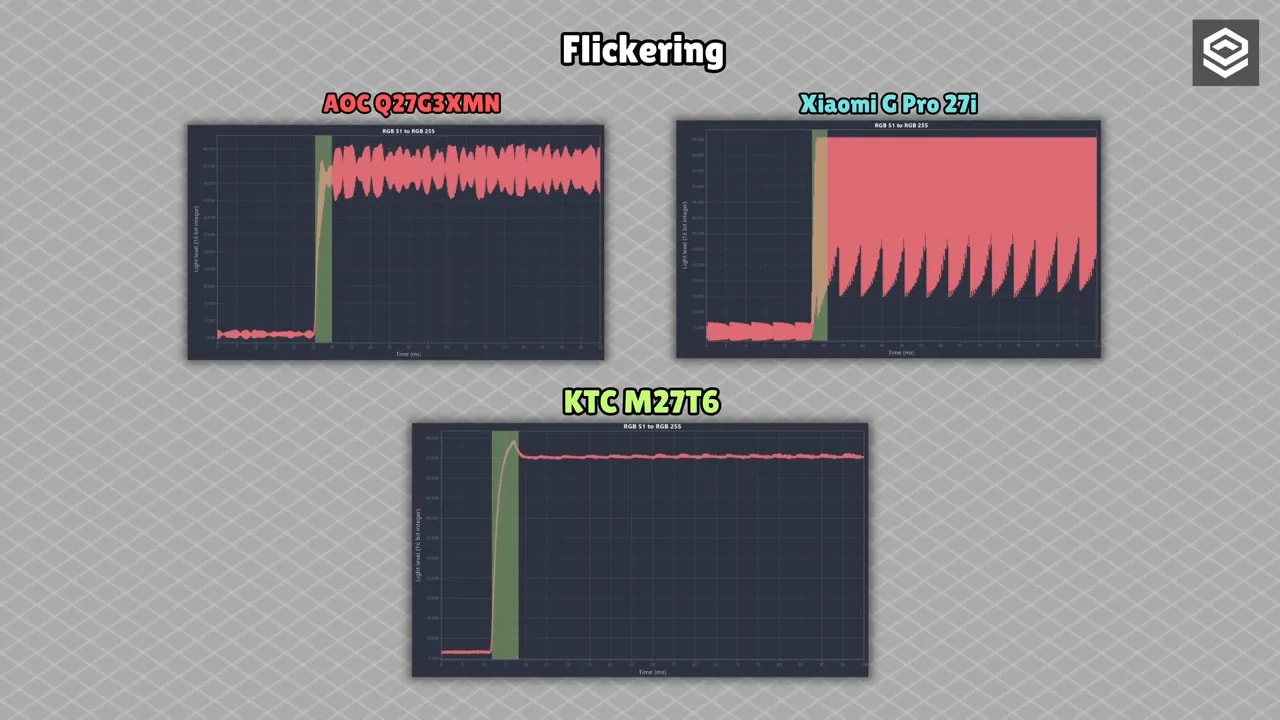
This is particularly interesting because other previously reviewed Mini LED monitors, such as the Xiaomi and AOC, used PWMbacklighting. This means the light pulses very rapidly. It is not always visible to the naked eye, but it can affect eye fatigue depending on individual sensitivity.
The KTC M27T6 is advertised with DCbacklighting, which is desirable for reducing this issue. Although a dedicated backlight flicker instrument was not used, comparison with the response-time tool did show that it flickers far less than the other two Mini LED monitors.
It cannot be guaranteed 100% flicker-free in every circumstance, because minimal flicker was occasionally visible. But it does appear clearly better in this respect than the Mini LED alternatives mentioned.
Conclusion: who should accept the tradeoff?
The KTC M27T6 was an especially complicated monitor to review because it has many quirks, and they do not all point in the same direction. It does some things very well, while others raise clear concerns.
The best of the KTC M27T6 would be:
- Very wide color gamut for an LCD.
- Mini LED with 1152 zones and unusually little blooming.
- Blacks and perceived contrast far superior to conventional IPS or VA.
- Good price for what it offers.
- Better backlight flicker behavior than other inexpensive Mini LED monitors.
- Good experience for media and visually focused games.
The worst of the KTC M27T6 would be:
- The main HDR mode’s progressive brightness decline is the biggest problem.
- The VA panel has poor viewing angles.
- Ghosting and smearing remain present and noticeable when coming from fast monitors.
- Not a recommended purchase for demanding competitive gaming.
- Native mode delivers very vivid colors, but needs calibration for accuracy.
If you mainly want a monitor for content consumption, noncompetitive gaming, reasonable HDR despite its quirks, and an image with plenty of visual punch, the KTC M27T6 makes sense. In fact, at its price, it is quite appealing.
If your priority is playing shooters or competitive games with as little trailing as possible, or if viewing angles are an obsession, it would not be the right option.
It is not a monitor for everyone. But for a very specific kind of user, the KTC M27T6 could be an interesting purchase, provided you know exactly what it does and does not offer.